

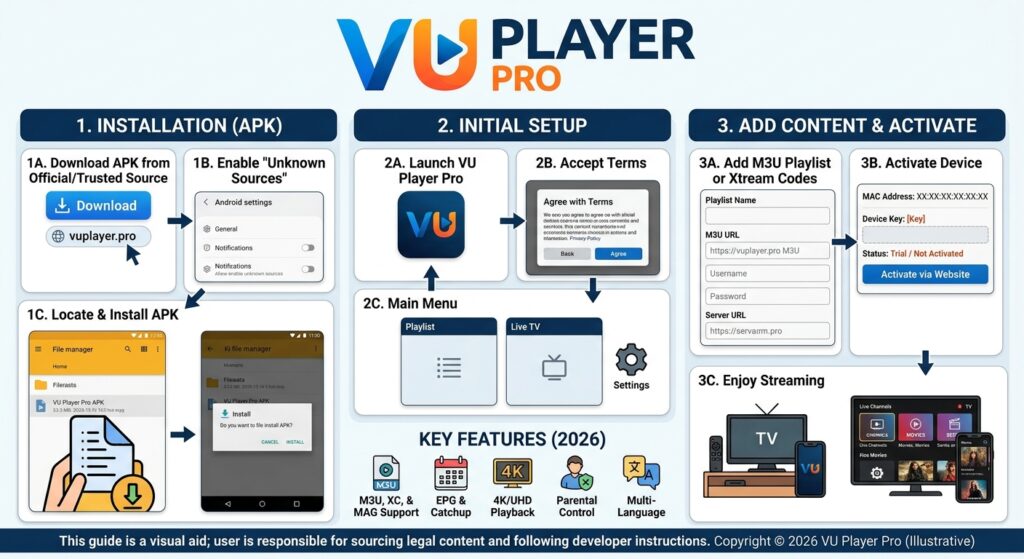
VU Player Pro APK 2026: Complete Installation and Setup Guide
Welcome to your complete guide on VU Player Pro APK. This article will walk you through everything you need to know about this powerful media player, from understanding what it is to installing and activating it on various devices.
1. What is VU Player Pro APK?
VU Player Pro is a versatile media player application designed to stream online content through playlists. It supports M3U and Xtream (XC) playlist formats, making it an excellent choice for users who want to organize and enjoy their media collections.
The app features a user-friendly interface, supports high-quality video playback, and works across multiple platforms. It is available as both a free and premium version, with the Pro version offering additional features and an ad-free experience.
2. Compatible Devices and Platforms
One of the biggest advantages of VU Player Pro APK is its wide compatibility. You can install and use this player on virtually any device you own:
| Platform | Availability And Download |
|---|---|
| Google Play Store | Android devices |
| Apple App Store | iPhone, iPad, Apple TV |
| LG Smart TVs | WebOS TVs |
| Samsung Smart TVs | Tizen OS |
| Roku TV | Roku devices |
| Windows Store | Windows PCs |
| VIDAA | Hisense Smart TVs |
| Zeasn TV | Android TV boxes |
| Android APK | Fire TV, Android boxes, phones |
| Windows Desktop | Windows PC (EXE installer) |
Whether you’re using a smartphone, tablet, smart TV, or computer, VU Player Pro APK has you covered.
Download the APK file for Android and Fire TV (AFT downloader code is 327187)
3. How to Use VU Player Pro APK
Using VU Player Pro APK is simple. Follow these steps to get started:
Step 1: Register for Free
Before you can use the app, you need to create a free account. Registration is quick and easy—just visit the official VU Player Pro website and sign up. This account will help you manage your playlists and device activations.
Step 2: Add Your Playlists
Once registered, you can add your playlists. VU Player Pro supports two main playlist formats:
-
M3U Playlists: Standard playlist format for IPTV and media streaming
-
XC (Xtream) Playlists: Advanced format with additional metadata
To add a playlist, log in to your account and navigate to the playlist management section. Enter your playlist URL or upload your M3U/Xtream file.
Step 3: Activate Your Device via In-App Purchase
After installing the app on your desired device, you’ll need to activate it. Activation is done through an in-app purchase, which unlocks all Pro features and removes any limitations. Once activated, you’ll have full access to the player’s capabilities.
Step 4: You’re Done!
That’s it! After completing these three steps, you can start streaming your content immediately. The app will load your playlists, and you can browse channels, movies, and series with ease.
4. Download VU Player Pro APK
To experience seamless streaming with VU Player Pro, download the app from the official sources below:
Android / Google Play
Get the app from the Google Play Store for all Android devices, including phones and tablets.
Apple App Store
Available for iOS devices, including iPhone, iPad, and Apple TV.
LG Smart TVs
LG TV users can find the app in the LG Content Store for WebOS TVs.
Samsung Smart TVs
Samsung TV users can download it from the Samsung Smart TV app store.
Roku TV
Roku users can add the channel from the Roku Channel Store.
Windows Store
Windows users can install the app from the Microsoft Store.
VIDAA (Hisense TVs)
Hisense Smart TV owners can download it from the VIDAA app store.
Zeasn TV
For Android TV boxes running Zeasn TV, the app is available in their store.
Android APK (Direct Download)
If you prefer sideloading, you can download the APK file directly. This is especially useful for Fire TV and Android TV boxes. For Fire TV users, the AFT downloader code is 327187.
Windows Desktop
A dedicated EXE installer is available for Windows PC users who prefer a desktop application.
5. How to Install and Activate VU Player Pro
Follow this step-by-step guide to install and activate VU Player Pro on your chosen platform:
Step 1: Install the App
Download and install VU Player Pro from your device’s app store or using the direct APK/EXE file. Make sure you are downloading from an official source to avoid security risks.

Step 2: Open the Official Website HERE
After installation, open a browser and go to the official VU Player Pro APK website. Log in to your account if you haven’t already.
Step 3: Add Your MAC Address and Device Key

Once logged in, navigate to the device activation section. You will need to enter:
-
MAC Address: Found in the app’s settings on your device
-
Device Key: Also displayed within the app
Refer to the in-app instructions or screenshots to locate this information easily.
Step 4: Manage Your Playlists
After adding your device, go to the playlist management section. Here you can:
-
Add new M3U or Xtream playlists
-
Edit existing playlists
-
Remove playlists you no longer need
-
Set a PIN code if you want to protect your playlists (leave empty if not needed)

Step 5: Complete Activation
Follow the on-screen prompts to complete the activation process. This typically involves an in-app purchase to unlock Pro features.
Step 6: Restart the App
After completing all steps, close the app completely and reopen it. Your playlists should now be loaded, and all features should be available for use.
6. Tips for Optimal Use
-
Network Connection: Ensure you have a stable internet connection for smooth streaming.
-
Playlist Quality: Use high-quality, regularly updated playlists for the best experience.
-
PIN Protection: Consider setting a PIN if multiple users access your device.
-
Regular Updates: Keep the app updated to enjoy new features and bug fixes.
-
Backup Playlists: Save your playlist URLs in a safe place in case you need to reinstall.
7. Frequently Asked Questions (FAQ)
Q: Is VU Player Pro free?
A: The app offers a free version, but the Pro features require an in-app purchase for activation.
Q: Does VU Player Pro provide content?
A: No, VU Player Pro is a media player only. You need to provide your own M3U or Xtream playlists.
Q: Can I use VU Player Pro APK on Fire TV?
A: Yes, you can sideload the APK using the downloader code 327187.
Q: What is the AFT downloader code?
A: The code is 327187 for Fire TV users to download the APK directly.
Q: Do I need to register?
A: Yes, you need to create a free account on the official website to manage playlists and activate devices.
Q: How do I find my MAC address and device key?
A: These are displayed inside the app settings after installation.
Q: What playlist formats are supported?
A: VU Player Pro APK supports M3U and Xtream (XC) playlist formats.
Conclusion
VU Player Pro APK is a powerful, cross-platform media player that brings your playlists to life. With support for multiple devices, easy installation, and simple activation, it’s an excellent choice for anyone looking to organize and stream their media content.
Follow this guide step by step, and you’ll be enjoying your favorite channels, movies, and series in no time. Happy streaming!
Disclaimer: This guide is for informational purposes only. VU Player Pro APK is a media player application. It does not host or provide any content. Users are solely responsible for ensuring they have the legal right to access and play any content they use with this app.